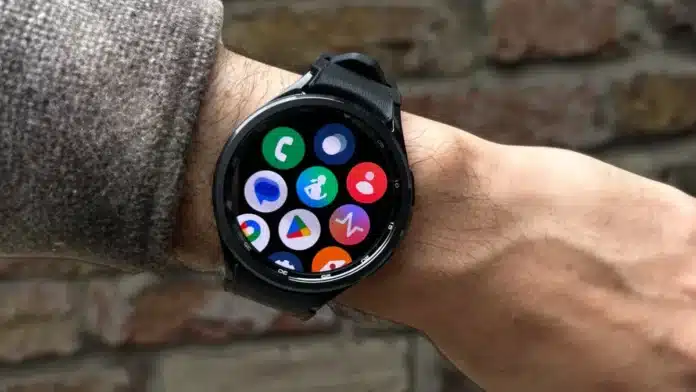
How to Keep Your Galaxy Watch 4/5/6 Workout Screen Active

WhatsApp Group Join Now
Telegram Group Join Now

Key Takeaways:


  • Enable Samsung Health Notifications – This prevents the workout screen from switching back to the home screen.
  • Turn On Always-On Display – Keeps the screen visible but may drain the battery faster..


Ever been in the middle of an intense workout, only to find your Galaxy Watch screen has mysteriously switched back to the home screen? Annoying, right? I’ve been there too, and trust me, it’s frustrating.

You just want to track your progress, but your watch has other plans. Don’t worry—I’ve got you covered. Here, I will explain how to keep your Galaxy Watch 4/5/6 workout screen active.

How to Keep Your Galaxy Watch 4/5/6 Workout Screen Active

1. Enable Samsung Health Notifications

The main reason your workout screen keeps disappearing? Samsung Health notifications are turned off. When notifications are disabled, your watch assumes you don’t need to see your workout stats (which is ridiculous, I know). Thankfully, fixing this is super easy. Here’s what you need to do:

  • First, make sure your watch and phone are connected.
  • Open the Galaxy Wearable app on your phone.
  • Tap Watch Settings, then go to Notifications.
  • Select App Notifications and find Samsung Health.
  • Turn on Samsung Health notifications—yes, all of them!

Once you do this, the ‘Workout in Progress’ icon will stay on, and your screen won’t keep disappearing like a magician’s trick.

2. Enable Notifications Directly on Your Watch

Maybe you don’t want to fiddle with your phone. No problem! You can also enable notifications directly on your watch. Here’s how:

  • Swipe down from the watch home screen.
  • Tap the Settings (gear) icon.
  • Select Apps, then tap App List.
  • Find Samsung Health and tap on it.
  • Go to Permissions and allow notifications.

Boom! Now, your watch won’t rudely interrupt your workout by switching screens.

3. Turn On Always-On Display

Another handy trick? Turn on the Always-On Display feature. It keeps your watch screen lit up, so you can check your stats anytime—no tapping required. Here’s how to enable it:

  • Swipe down from the top of the screen.
  • Tap the Settings (gear) icon.
  • Go to Display and find Always-on screen.
  • Toggle the switch ON.

Now, your screen will always be visible—just like that one overenthusiastic gym trainer who never stops watching you. One thing to note, though: this feature does drain your battery faster. So if your watch dies in the middle of the day, don’t say I didn’t warn you!

Be a true Tech Enthusiast and get all Unplux publications update’s early access by joining our Telegram Channel and WhatsApp Channel.

Shiny
Shinyhttp://www.unplux.com
Say hello to Shiny, the medical pro with a tech-savvy twist! When she’s not saving lives, she’s diving deep into the world of smartphones and consumer gadgets. A true tech enthusiast, Shiny loves testing the latest devices, sharing insights, and staying ahead in the digital landscape. A perfect blend of care and curiosity!

Related Posts

Realme Narzo Phones Confirmed to Launch in India Soon

Realme Narzo Phones Confirmed to Launch in India Soon, and the company has started sharing strong teasers online. The teasers show two new phones...

Redmi Note 15 5G Series Price, Battery Capacity and Other Information Leaks Out

Redmi Note 15 5G Series Price, Battery Capacity and Other Information Leaks Out as new global leaks appear online. The series is already selling...

Vivo X300 Launched in India With Full Specifications and Pricing

Vivo X300 Launched in India with strong flagship features. The phone brings a bright display and powerful cameras. It also offers long software support...

Xiaomi 17 Ultra Tipped to Launch This Month With New Upgrades

Xiaomi 17 Ultra tipped to launch this month according to new leaks shared by reliable tipsters. The device is expected to join the Xiaomi...

How to Customise Android and iOS Lock Screen for a Smarter Experience

Customise Android and iOS Lock Screen to make your daily phone use simpler and faster. People check their phones very early each morning. A...

How to Translate Emails in the Gmail Mobile App Easily

Translate emails easily in Gmail mobile app. Supports 100+ languages, works on Android and iOS. Simple, quick, and built-in feature.

How to Record and Send Short Video Messages on WhatsApp in 2025

Record and send short WhatsApp video messages easily. Play automatically, stay private, and express emotions in 60 seconds.

ROG Xbox Ally and ROG Xbox Ally X Pre-Order Starts Worldwide

ROG Xbox Ally and ROG Xbox Ally X Pre-Order Starts today with powerful handhelds, exclusive bundles, and global availability.

Sony State of Play September 2025: Time, Games, and Watch Guide

Sony State of Play September 2025 brings Saros, Ghost of Yotei, plus rumored Wolverine, God of War, and Resident Evil reveals.

Samsung Galaxy Tab A11 Launched in India: Full Specs, Price and Features

Samsung Galaxy Tab A11 launched in India with 8.7-inch display, 90Hz refresh, 5,100mAh battery, dual cameras, and Dolby speakers.

Leave a reply

Please enter your comment!
Please enter your name here