Share Your Location on Android helps during modern daily travel. Friends easily follow journeys and meeting locations safely today. Families also track loved ones during emergency situations quickly.
Android phones provide many free sharing options already installed. These tools work smoothly across different messaging applications worldwide.
Share Your Location on Android Using Google Maps
Google Maps remains the most trusted sharing application worldwide. The app supports live and static location sharing features.
Many Android phones already include Google Maps by default. The app works smoothly across Android and iPhone devices.
Why Google Maps Works Better Daily
Google Maps offers several helpful sharing choices for users. People share live movement updates during long road trips.
Others send static locations during simple meetup situations regularly. Google Maps also supports route and ETA sharing features.
The app works with Google and non-Google users easily. Users can create sharing links for anyone instantly online.
This flexibility makes Google Maps extremely useful worldwide today.
Share Live Location With Friends Easily
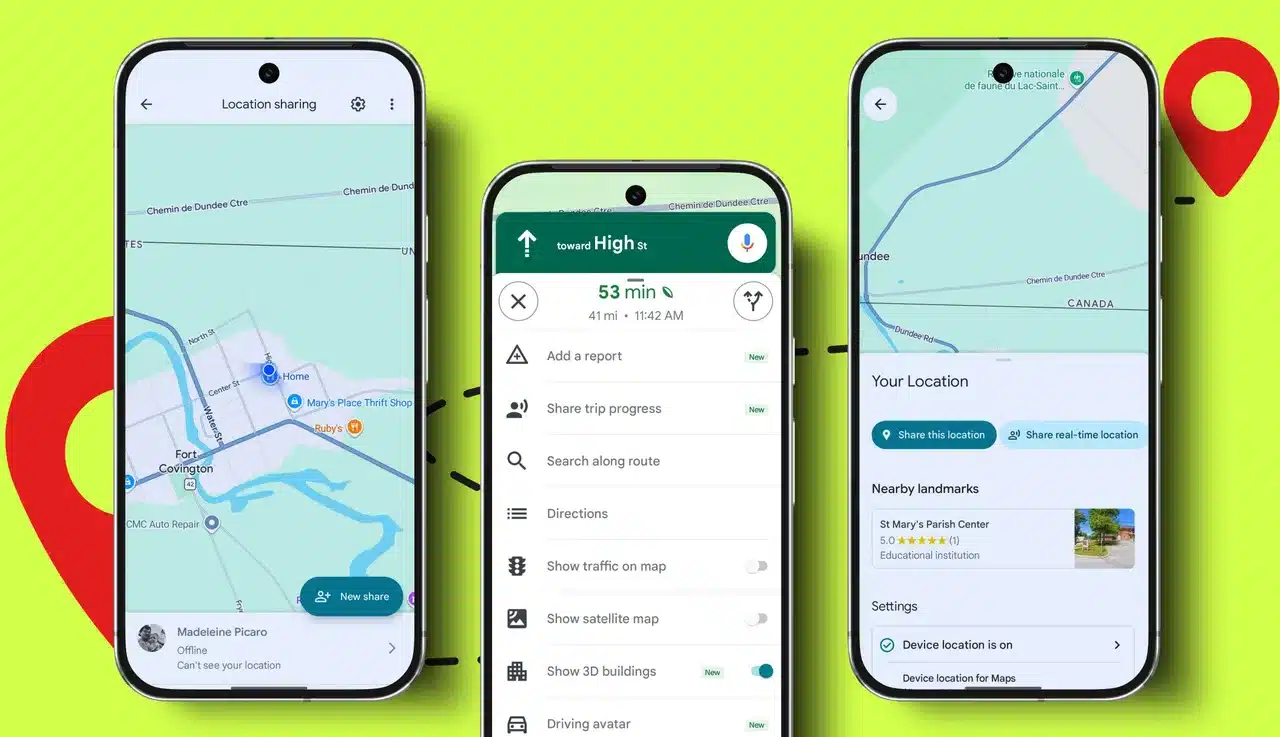
Open Google Maps on your Android smartphone first carefully. Tap your profile picture from the upper corner screen. Choose
Location Sharing from the available settings menu afterward. Tap New Share for starting live location sharing immediately.
Select your preferred sharing duration before continuing further carefully. Choose contacts directly from saved phone contacts afterward easily. You may also create links for sharing elsewhere quickly.
Friends can watch your movement updates in real time. Google Maps sometimes also displays remaining battery information additionally. This helps people understand your phone condition during journeys.
Share Static Current Location Quickly
Static location sharing works better during short casual meetings. Open Google Maps and press your blue location marker.
Users may also long-press anywhere on displayed maps easily. A location pin appears instantly after pressing the screen properly.
Tap Share from the available menu below immediately afterward. Send the generated link through messaging applications quickly.
The receiver only sees your saved current location position. Movement updates never appear after sending static location details.
Share Trip Progress During Navigation
Google Maps also supports trip progress sharing during navigation. Start your destination navigation before enabling this useful feature. Tap remaining travel time shown below navigation directions carefully.
Choose Share Trip Progress from available sharing options immediately afterward. Contacts receive route details and estimated arrival information instantly.
Sharing automatically stops after reaching selected destinations successfully. This feature works perfectly during long family road journeys. Friends also receive better arrival updates during heavy traffic.
Share Locations With Non-Google Users
Many contacts never use Google accounts during everyday communication. Google Maps still supports sharing with those users smoothly.
Create a location sharing link from Maps settings quickly. Copy the generated link into preferred messaging applications easily afterward.
Anyone opening the link can track shared locations instantly. Even iPhone users can access shared map information successfully.
Android Privacy Updates And Background Access
Android 10 introduced stronger privacy protections for users recently. Many applications lost continuous background location access permissions afterward.
Google Maps still supports background location access properly today. Users completely control permissions from Android settings pages manually.
People may allow or deny location access anytime easily.
Android: Live Location
Through Messaging Applications
Messaging applications provide faster location sharing for daily conversations. Many users already communicate through these applications every single day.
Sharing locations inside chats feels simple and comfortable always.
Share Your Location on Android With Google Messages
Google Messages provides quick sharing directly inside text conversations. Open any conversation inside Google Messages before starting anything.
Tap the plus icon near your typing area carefully. Choose One-Time Location from displayed sharing options afterward immediately.
Select your current location or nearby places from maps. Send the generated location directly through your conversation instantly.
Receivers get Google Maps previews inside conversation windows automatically sometimes. This makes understanding locations easier during busy conversations daily.
Share Real-Time Location Through Messages
Google Messages now supports live tracking for Android users additionally. Open a conversation and choose Real-Time Location carefully afterward.
Select your preferred sharing duration before sending updates finally. Friends can follow your movement directly through text conversations continuously. Users may stop sharing anytime from active conversation settings easily.
This feature works perfectly during crowded city meetup situations regularly. People avoid unnecessary phone calls during complicated travel moments.
Share Your Location on Android With WhatsApp
WhatsApp remains the most used messaging application globally today. The application supports live and static location sharing features.
WhatsApp also protects chats using strong encryption technology completely. Open WhatsApp and choose your preferred conversation carefully first.
Tap the attachment icon shown below conversation windows immediately. Select Location from available sharing options displayed afterward properly.
Send Live Location Through WhatsApp
Choose Share Live Location for real-time movement tracking features afterward. WhatsApp allows sharing between fifteen minutes and eight hours.
Friends can follow your movement directly inside conversations continuously.
Users may stop live sharing anytime from active chat settings. This flexibility makes WhatsApp highly useful during modern travel situations.
Send Current Or Nearby Locations
WhatsApp also supports static current location sharing for users daily. Choose Send Current Location from available sharing choices immediately.
Nearby places like hotels and cinemas sometimes also appear. This feature helps during restaurant meetings and local travel situations.
Friends quickly locate nearby places without additional searching efforts.
Share Your Location on Android With Facebook Messenger
Facebook Messenger provides another fast location sharing option today. Many users already communicate through Messenger every single day worldwide.
Open Messenger and choose your preferred chat conversation carefully first. Tap the four-dot button or location icon afterward immediately.
Allow location permissions if Messenger requests access initially sometimes.
Share Live Location Inside Messenger
A map showing your current location appears automatically afterward instantly. Tap Start Sharing Live Location for real-time tracking updates immediately.
Messenger supports live sharing for sixty minutes maximum currently. Friends can track your movement directly from Messenger conversations easily.
This method removes extra sharing links during conversations completely.
Send Pinned Locations Through Messenger
Messenger also supports pinned location sharing for Android users daily. Drop a location pin manually on displayed maps carefully.
Tap Send Location for sharing selected places instantly afterward. Friends instantly receive your saved map positions inside conversations.
Users may stop sharing anytime through conversation settings easily.
With Telegram And Snapchat
Telegram and Snapchat also support Android location sharing features smoothly.
These applications provide quick sharing during daily friendly conversations regularly.
Share Locations Through Telegram
Telegram works similarly to WhatsApp location sharing systems mostly today. Open Telegram and choose your preferred contact carefully first.
Tap the attachment icon below conversation windows afterward immediately. Select Location from displayed options before continuing further carefully afterward.
Choose Share My Live Location for movement tracking updates. Select your preferred duration before starting live sharing finally.
Telegram automatically stops sharing after selected durations finish successfully. Users may also send static current locations anytime easily.
Share Nearby Places Through Telegram
Telegram sometimes displays nearby places below map information automatically afterward. Users can share restaurants and public places very quickly.
This feature works nicely during city travel and meetings. People may stop sharing from notification controls anytime afterward easily.
Telegram offers simple controls for privacy-focused smartphone users globally.
Share Locations Through Snapchat
Snapchat also supports easy location sharing for Android smartphone users. Open Snapchat and swipe left for accessing conversation windows quickly.
Press and hold your friend’s conversation carefully afterward immediately.
Tap Send My Location from displayed sharing options afterward directly. Friends instantly receive your current location details through chats.
Snapchat also supports requesting another person’s location information easily. This feature works perfectly for younger smartphone users daily worldwide.
During Emergency Situations
Location sharing becomes extremely important during dangerous situations, sometimes unexpectedly.
Android phones include tools designed specifically for personal safety. These features help during solo travel and nighttime walks.
Use Google Personal Safety Features
Many Android phones already include the Personal Safety application installed. Google created this application for emergencies and safety check-ins.
Open Personal Safety on your smartphone before starting anything carefully. Choose the Home tab from available navigation options afterward immediately.
Tap Safety Check for enabling safety monitoring features instantly afterward.
Set Trusted Contacts For Emergency Sharing
First-time users must complete setup instructions before using features properly. Choose trusted contacts from saved phone contacts afterward carefully.
Allow requested location permissions during setup processes successfully afterward. Users may also share optional battery information with contacts additionally.
Battery details help people understand phone conditions during emergencies better.
Start Safety Checks During Solo Travel
Open Personal Safety whenever traveling alone during nighttime journeys regularly. Select activities like walking from available choices displayed afterward immediately.
Set your preferred timer duration before continuing further carefully. Choose contacts receiving emergency alerts during missed check-ins afterward immediately.
Ensure notifications remain enabled during setup processes correctly. Tap Start for activating Safety Check features successfully afterward.
Use Emergency Sharing For Live Updates
Emergency Sharing provides live location updates during dangerous situations instantly. Open Emergency Sharing during active Safety Check sessions carefully afterward.
Tap Start for sending real-time updates to trusted contacts immediately.
Contacts receive text or email notifications automatically afterward quickly. They also receive Google Maps links showing your movement continuously.
Users may stop emergency sharing after reaching safe locations successfully. Google also requests confirmation before stopping sharing completely afterward automatically.
The Bottom Corner
Share Your Location on Android improves safety and daily communication greatly. Google Maps offers the most complete sharing experience currently available.
Safety tools also protect users during emergencies and solo journeys. These free features help families stay connected everywhere safely.